360 product photography
How to set up a 360 product photography studio
Space, lights, turntable, camera, and frame count — whether you are starting on a desk or running a production floor. Then host the spins on a 360 product viewer and publish them to ecommerce.
360 Product Photography Guide walks through capture, editing, hosting, and publishing.
What a 360 studio actually is
A 360 product photography studio is a repeatable setup: a still camera, even lighting, a rotating platform, and a background that stays the same for every frame. You do not walk around the product. The product rotates; the camera stays locked.
This page is about building your own studio. SpinShot makes the turntable, riser, and lifter and the hosted 360 product viewer (zoom, mobile, ecommerce embeds, analytics, pricing, and a free trial). We also shoot in-house for clients who ask — that is not what this guide is for.
Space
You do not need a warehouse. You need a room you can control.
How much room
For products up to about loaf-of-bread size, a small office is enough. Leave room for two side lights, a background light, a tripod, and a turntable on a table or stand about waist height.
Kill other light
Turn off ceiling lights and close blinds. Mixed daylight and studio lights shift color as clouds move. 360 views need every frame to match.
Write the setup down
Record camera height, distance to the turntable, light distances, and power settings. That is how a catalog stays consistent from product to product.
Lighting
Start with broad, diffused lights to either side of the product and a separately controlled background light. Keep ambient light, white balance, and exposure fixed. Preserve texture and believable reflections rather than flattening every surface into white.
Continuous lights make reflections visible during setup, but longer exposures require a stopped and settled product. Test LEDs for flicker or bands at your chosen shutter speed. Strobes can freeze motion and provide higher output, but need compatible triggering, supported camera synchronization, and enough recycle time. Neither option automatically fixes reflections.
Keep background light from spilling onto product edges or into the lens; a white background does not require clipped product highlights. Test a full rotation for color, shadow detail, changing reflections, and the last-to-first transition before locking the setup. Record light positions, modifier distances, and output.
For a highly reflective product, a paper tube around the turntable (seamless “Savage” paper works) wraps light around the subject. Polarizing filters help on glossy helmets, watches, and chrome. See studio supplies and strobe notes.
Turntable: manual vs motorized
A stable manually indexed platform is enough to learn. Motorized capture saves repeated positioning work; either approach needs equal angles, careful centering, and tested timing.
DIY / manual
Mark equal steps around the rim and use a fixed index point: 24 photos use 15-degree steps; 36 use 10-degree steps. Shoot each unique position once, without a duplicate final frame at 360 degrees.
Align the product with the rotation axis using a center mark or repeatable guide and a suitable non-damaging support. Check opposing silhouettes and the widest profile: if the item travels sideways in the frame, fix centering before editing.
Production / motorized
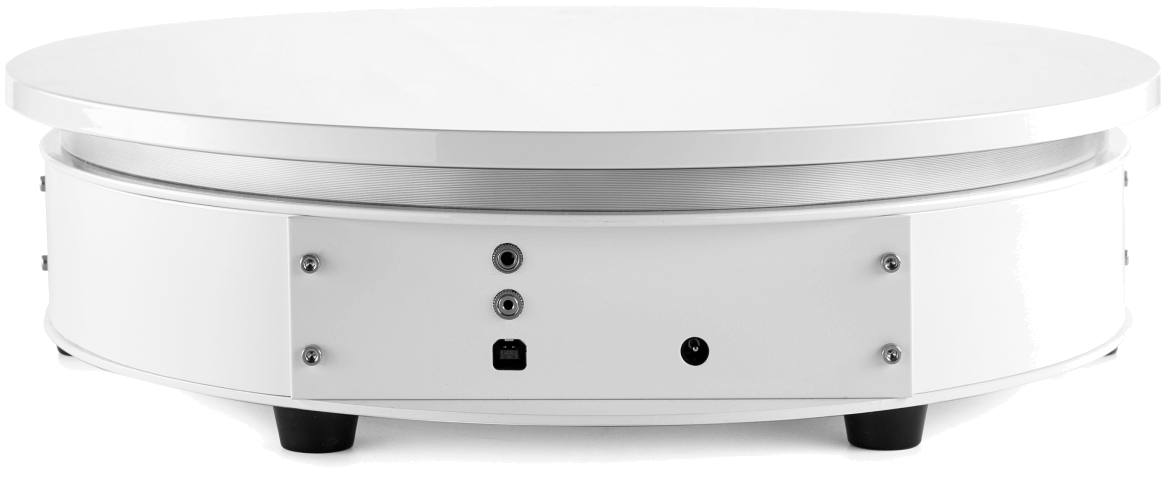
A SpinShot Turntable automates rotation so frame count and spacing stay consistent across a catalog. Pair with the Riser for shadowless white and the Lifter for small or off-center items.
Check platform size, rated load for the complete product-and-support assembly, balance, and clearance through a full rotation. Keep cables and loose parts clear. Verify the exact camera trigger connection and supported control software, not just the camera brand. Keep exported images usable with your chosen viewer.
Test the capture cycle
For motorized interval capture, verify the camera trigger before starting. Set frame count and direction, then adjust speed, acceleration, settle time, and shutter timing for the actual assembly. Let flexible supports and loose parts settle and strobes recycle before each shot. Continuous rotation needs its own motion-freezing test; stop-and-shoot timings do not transfer unchanged.
Inspect a full test sequence for missed triggers, blur, wobble, changing brightness, and an uneven last-to-first transition. Save the table settings alongside the camera and lighting recipe before batch production.
Camera and tripod
Use a sturdy tripod and manual exposure with fixed ISO, white balance, and focus. Choose aperture for the required depth of field, then match shutter timing to the lights and movement. Check your camera’s tripod stabilization guidance and test for drift or blur.
Follow the illustrated camera settings workflow for aperture, focus, continuous-light exposure, and strobe synchronization checks.
How many images
24 frames is the usual balance of smoothness vs shoot and edit time. Use a multiple of 4 so you keep exact front, back, and side angles. 12–16 is fine for price-driven catalogs. Jewelry and other sparkle-heavy products may want 72–120.
Read the frame count and image dimensions guide. Rotate clockwise; skip shooting the start frame twice.
A production workflow that holds up
- Unpack and clean. Dust on one frame becomes a blinking speck on 24. Lint roller, air puffer, extra minutes here save hours in Photoshop.
- Studio prep. Turntable centered, lights on, camera locked, color chart in the first test shot.
- Shoot. Product facing camera on frame one (people often face away). Check the subject stays in frame through a full rotation. Center circular objects before you start the set.
- Batch-edit. Same crop, white balance, and background treatment on every frame. Batch editing and Photoshop actions.
- Host and publish. Upload to a hosted 360 product viewer. SpinShot stores frames on a CDN, serves zoom and mobile, and embeds on Shopify, WooCommerce, Magento, and custom sites. Analytics, pricing, and a free trial are part of that software — not extras you bolt on later.
FAQ
How much space do I need for a 360 product photography studio?
A small room or office is enough for products up to about loaf-of-bread size. Close blinds and turn off other lights so your studio lights stay consistent.
Do I need a motorized turntable?
No. A manual turntable with evenly spaced marks works for beginners. A motorized turntable like the SpinShot Turntable is worth it when you shoot many products or need consistent frame spacing.
How many photos should I shoot per 360 view?
24 frames is a common balance of smoothness and production time. Use a multiple of 4 so you keep exact front, side, and back angles. Jewelry and other detail-driven products may use 72 or more.
What happens after I shoot the photos?
Batch-edit the set, upload to a hosted 360 product viewer, and embed the spin on your product pages. SpinShot hosts frames on a CDN, supports zoom and mobile, and embeds on Shopify, WooCommerce, Magento, and custom sites. A free trial is available.
Next: shoot, then publish
Use the photography guide for the first capture. Use hardware when you are ready to automate. Use the viewer to host, zoom, and embed — including Shopify.